How do you download and start LosslessCut safely?
On Windows the winget command is one paste; getting LosslessCut running from an official file takes four actions on any system.
- Or skip the file on Windows. Copy the winget command from the box, press Win+R, paste with Ctrl+V and press Enter; winget downloads, checks and installs LosslessCut for you.
- Download the file for your computer. Select the Windows 7z, the macOS DMG for your chip, or the Linux AppImage from the table or the download box.
- Check the SHA-256. Run the hash command for your system in the download folder and compare the result with the table.
- Extract or mount it. On Windows extract the 7z with 7-Zip; on macOS open the DMG and drag LosslessCut into Applications.
- Start LosslessCut. Run LosslessCut.exe from the extracted folder, open LosslessCut from Applications, or make the AppImage executable and run it.
The installation notes confirm there is no installer: the Windows download is an archive you extract with 7-Zip, and LosslessCut is not a portable app, so it keeps settings in your user folder.
Which LosslessCut file should you download?
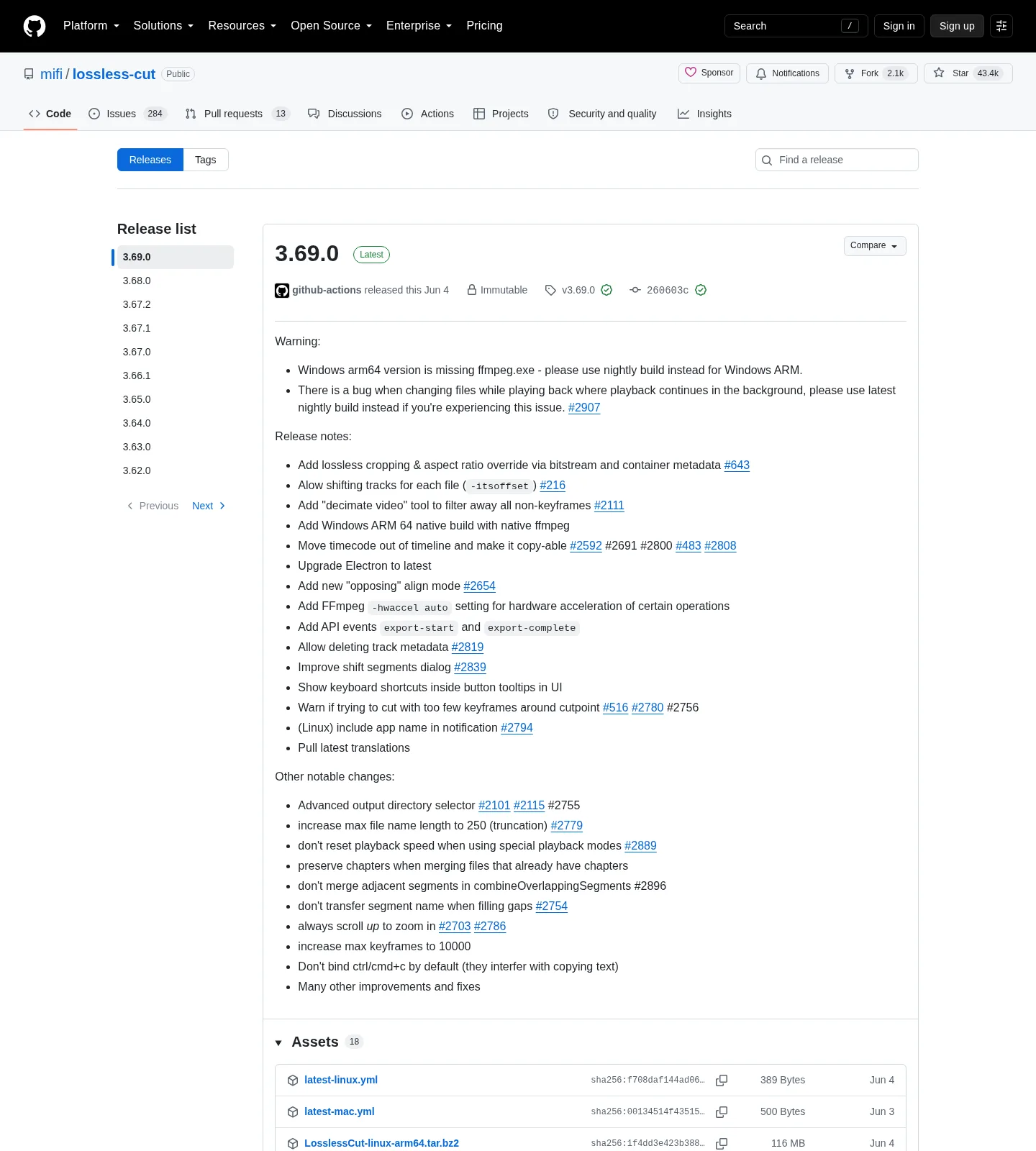
For most Windows PCs the right LosslessCut download is the Windows x64 7z; Macs need the DMG that matches their chip, and most Linux PCs can use the x64 AppImage. These are the files on release 3.69.0, published June 4, 2026.
| Build | File | Size | SHA-256 |
|---|---|---|---|
| Windows x64 7z | LosslessCut-win-x64.7z | 139 MB | baf7106576999e1460f918054e3ad4ae38a95469892cc6a1a97b4131f02818e4 |
| Windows ARM64 7z | LosslessCut-win-arm64.7z | 102 MB | 3d65a2fdb2b03789783e88dc150b6780e3252181b0fbc68c22f72339f1ac802b |
| macOS Apple Silicon dmg | LosslessCut-mac-arm64.dmg | 149 MB | c7801b482df3be0384acc8171d5a7d16cce70d1588871e344b155aaca39fa58b |
| macOS Intel dmg | LosslessCut-mac-x64.dmg | 161 MB | ab828d1a652c895661b15b682d81106562e0f11fabcb8c2d1e4bf2c4fdddf64a |
| Linux x64 AppImage | LosslessCut-linux-x86_64.AppImage | 211 MB | 179eaae27bffbe25a6549a4a714474126b57c288cefc307046fc9c6313a12676 |
| Linux x64 tar.bz2 | LosslessCut-linux-x64.tar.bz2 | 182 MB | cd69d7dda64b2978cead468c56703c1d58077e7a9c2379948a5d08816726a2e5 |
| Linux arm64 tar.bz2 | LosslessCut-linux-arm64.tar.bz2 | 116 MB | 1f4dd3e423b3888151c8a3203fcc0a4552af0538a32d88aabdc6c578e80bbd02 |
| Raspberry Pi armv7l tar.bz2 | LosslessCut-linux-armv7l.tar.bz2 | 110 MB | 4bb3abaac7972664f935fca7321baef95212d2f2d4fdf5772955f6ebefec8b7c |
To check a Windows download, open PowerShell in the download folder and run:
Get-FileHash .\LosslessCut-win-x64.7z -Algorithm SHA256On macOS or Linux, run this in Terminal with the file name you downloaded:
shasum -a 256 LosslessCut-mac-arm64.dmgThe SHA-256 values are GitHub's own digests for each release file. The Windows ARM64 7z is new in version 3.69.0, and its release notes warn that it is missing ffmpeg.exe, so Windows on ARM users should use the x64 file or the nightly build for now. The APPX and PKG files on each release are marked DONT-USE-THIS-FILE and are not listed here.
Is LosslessCut safe to download?
LosslessCut is safe when it comes from one of the developer's own channels. Its source code is public under the GPL-2.0 licence, and the README download section links these official routes:
- GitHub Releases: every Windows, macOS and Linux file with its SHA-256, always free.
- Microsoft Store and Mac App Store: support the developer and update automatically.
- Snapcraft and Flathub: the Linux alternatives the README links.
Other sites that repackage LosslessCut, such as portable-app bundles, are not supported by the developer, according to the installation notes. The winget package is also a repackage, so here is exactly what it does. The packaging workflow downloads the official Windows 7z from the mifi/lossless-cut release and re-compresses it as a ZIP without modifying the program. The ch.LosslessCut manifest in Microsoft's catalogue pins that ZIP's SHA-256, and winget refuses a file that does not match. It installs per user as a portable app and adds a LosslessCut command. If you would rather take nothing from a third party, use the GitHub file or a store listing.
Should you choose the store edition or the GitHub download?
Choose the GitHub download if you want the newest features for free, and a store edition if you prefer automatic, well-tested updates. The official FAQ says store versions are often a few versions behind, because the developer treats the newest GitHub release as a public beta and moves it to the stores once it has proved stable. Features are the same except for platform limits: the Mac App Store edition cannot open VOB files and asks for an output folder before it can save.
Which operating systems does LosslessCut support?
LosslessCut 3.69.0 runs on Windows 10 and 11, macOS 12 or later, and 64-bit Linux, with ARM64 builds for Apple Silicon, Linux and Windows. The requirements page records that version 3.66 dropped macOS 11 and 3.52.0 dropped Windows 8.1; older LosslessCut releases still run on those systems.
Frequently asked questions
Is there a winget package for LosslessCut?
Yes. The winget ID is ch.LosslessCut, in the microsoft/winget-pkgs catalogue. It is maintained by a community packager, Chris Huang, not by the developer, who has said he does not want to maintain more build systems (issue #1279). The packaging repository repacks the official Windows 7z as a ZIP without changing the program, and winget checks that ZIP's SHA-256 before it installs.
Do I need to install FFmpeg for LosslessCut?
No. LosslessCut is built on FFmpeg and each download carries its own copy, so there is nothing else to install. The one exception is the new Windows ARM64 7z, which the release notes say is missing ffmpeg.exe.
Which file do I need for a Mac?
Use the Apple Silicon DMG on Macs with an M-series chip and the Intel DMG on older Intel Macs. The PKG attached to each release is named DONT-USE-THIS-FILE and does not work as a manual install.
How do I uninstall LosslessCut?
Delete the folder you extracted, or drag the app from Applications to the Trash. To remove settings, logs and caches too, delete %APPDATA%\LosslessCut on Windows, ~/Library/Application Support/LosslessCut on macOS or ~/.config/LosslessCut on Linux.