How do you fix a LosslessCut cut that starts early?
Fixing an early start in LosslessCut takes up to six actions; stop as soon as the test file begins where you want.
- Show the keyframes. Zoom into the timeline until the thin vertical keyframe lines appear near your start mark.
- Move the start mark. Place the playhead a few frames after the keyframe you want the clip to begin on and press I.
- Export one test segment. Press E, confirm Export, and play the first second of the new file.
- Shift the start if it is still early. Open Edit → Segments → Shift all segments on timeline, enter 00:00:00.200 and choose Start.
- Try the other cut mode. In the export overview, switch Keyframe cut mode off, export again and compare the two files.
- Try Smart cut last. Turn on Smart cut (experimental) in the export overview, export to a new file and check picture, sound and length.
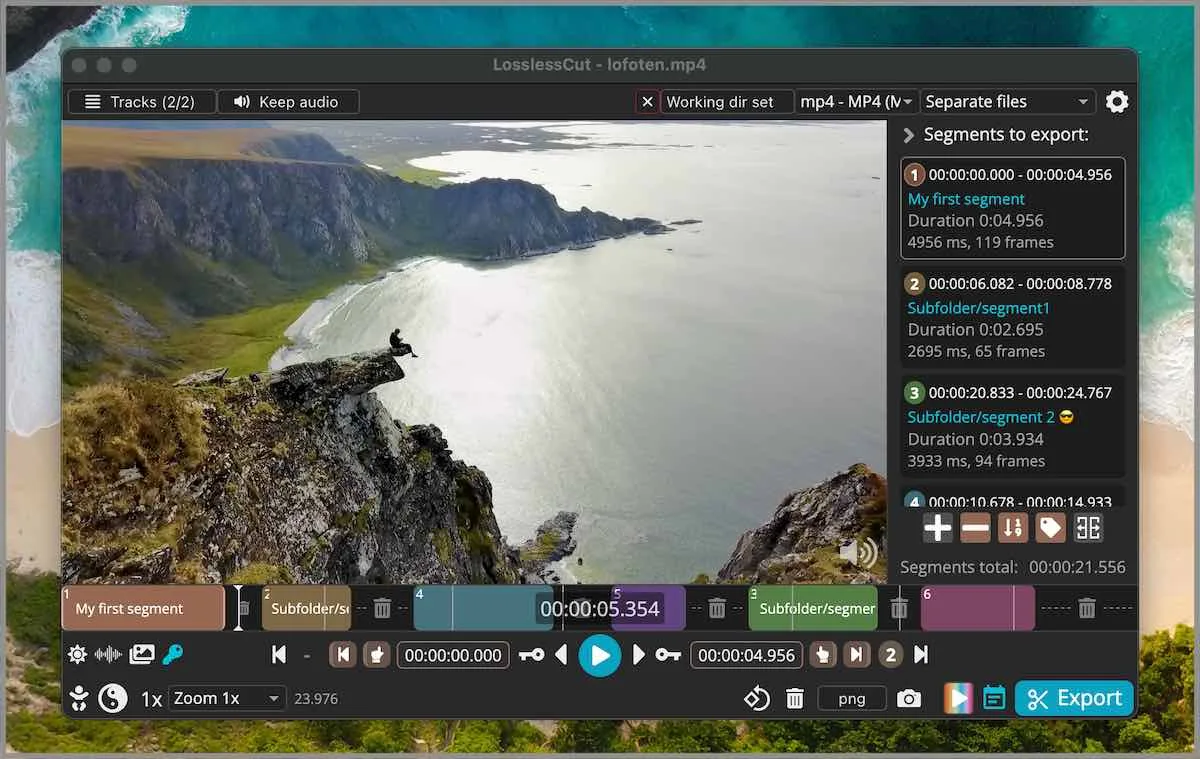
Keep the source file until a test export plays correctly. LosslessCut never overwrites it, so every attempt is a new file you can compare side by side.
Why does a lossless cut have to start on a keyframe?
A lossless cut has to start on a keyframe because most frames in a compressed video only store the changes from earlier frames. A keyframe is a complete picture, so it is the only safe place for a copied stream to begin. LosslessCut copies the encoded data without rebuilding frames, and the official troubleshooting guide says each segment's start is normally rounded to the nearest previous keyframe. How far back that is depends on how often the camera or app that made the file wrote a keyframe; if you control that app, a shorter keyframe interval gives LosslessCut more places to cut.
The end of a segment is not affected in the same way, so a clip that starts early usually still ends where you pressed O.
What is the difference between Keyframe cut mode and normal cut mode?
Keyframe cut mode tells FFmpeg to seek to the keyframe before your start mark, which the guide compares to -ss placed before -i. It is on by default (On in configStore.ts) because most common files need it. With the mode off, the cut corresponds to -ss after -i, which gives a better start for some files and a worse one for others. The export overview shows a note, Keyframe cut is recommended for most common files, when you turn it off.
When should you use Smart cut?
Use Smart cut only when the exact first frame matters more than a perfectly lossless file. It is off by default and labelled experimental; the app itself warns that Smart cut is experimental and will not work on all files. Smart cut re-encodes the frames from your start mark to the next keyframe and copies the rest, so test the output's picture, sound, duration and playback in the player you will use. The troubleshooting guide suggests remuxing to MP4 first if Smart cut misbehaves.
Which fix matches your symptom?
Each row below comes from the official troubleshooting guide at tag v3.69.0.
| Symptom | Likely cause | Fix |
|---|---|---|
| Clip starts before the I mark | Start rounded to the previous keyframe | Move I a few frames after the keyframe you want |
| Clip starts one keyframe too early | FFmpeg misses the nearest keyframe in some files | Shift all segment starts by 00:00:00.200 |
| Start mark is ignored | Too few keyframes before the cut | Try Smart cut, or turn Keyframe cut mode off |
| Output is as long as the input | A track that cannot be cut was copied whole | Disable all tracks except video, then re-add |
| Audio out of sync at the start | Start point sits right on or between keyframes | Move the start a few frames before or after the keyframe, or change avoid_negative_ts |
| VP9 download ignores start keyframes | Matroska output with some yt-dlp files | Set the output format to MP4 |
| Smart cut repeats a segment | Experimental Smart cut on this file | Turn on Shift all start times, or remux to MP4 first |
Since version 3.69.0 LosslessCut also warns before export when a cut point has too few keyframes around it, so heed that warning before you rely on the clip.
Frequently asked questions
Is LosslessCut frame accurate?
Not with a normal copy cut. The end of a segment lands where you press O, but the start usually snaps back to the previous keyframe, so the clip can begin up to a few seconds early in files with long gaps between keyframes.
Does Smart cut re-encode my video?
Only a little. Smart cut re-encodes the frames between your start mark and the next keyframe and copies the rest unchanged. Because it re-encodes any portion of the picture, a Smart cut is not purely lossless, even though most of the file is copied untouched.
Should Keyframe cut mode be on or off?
On for most files, which is the default. The troubleshooting guide says most common video files need it, but some cut better with it off, so export a short test both ways when the start looks wrong.
Why does my exported file have the same length as the original?
Usually one track could not be cut and was copied whole. Disable every track except the video in the Tracks panel, export again, then add tracks back one at a time to find the one that fails.